
Download Images from Multiple URLs
Paste one public webpage URL per line to download images from multiple URLs. Source Image Finder scans those pages and checks for larger or higher-resolution public versions of the images it finds.
Only need one webpage? Use Scan Single Page →
Bulk download images from multiple webpages
Paste one public webpage URL per line. Source Image Finder processes only the exact pages you enter and keeps each webpage result separate.
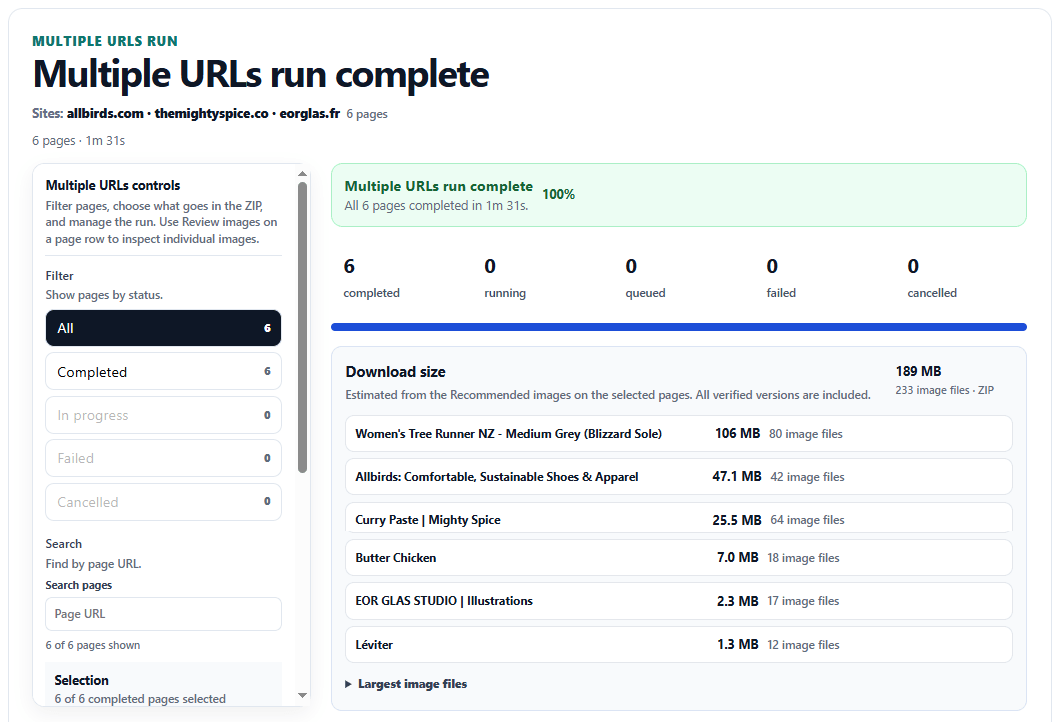
A completed run shows each page's status and image counts, and lets you select completed pages for one combined ZIP or download a page on its own.
Why use Multiple URLs
Keep each page separate
Each page has its own results, status, and image counts, so you can see where every image came from.
Keep completed pages if something goes wrong
If one page fails or you cancel the remaining work, completed pages stay available. Retry only the unfinished pages instead of rerunning successful pages.
Download together or page by page
Choose which completed pages belong in one ZIP, or download an individual page when you only need part of the run. You can also open Review images for a page before downloading it.
In a combined ZIP, each webpage stays in its own folder. The export also includes a run manifest and per-page metadata so downloaded files can be traced back to the page they came from.
Check ZIP completeness and retry missing images
After a ZIP is built, check how many image files were included. If some image downloads fail, retry those files without scanning the completed webpages again. That is separate from retrying a webpage that failed to scan.
Control what goes into the ZIP
Recommended images are included by default. You can filter by size or format, choose filenames, and include page graphics with Include Site UI. You can also include all verified versions, resize images, or convert downloaded copies to another format.
Each page also gets the same verified source-file checks used by Scan Single Page. Learn about higher-resolution image recovery →
What happened in a four-page Multiple URLs test?
We scanned four public webpages. Three completed, and one deliberately returned an error. All 63 selected images from the completed pages made it into the ZIP.
Retrying the failed webpage kept the other three pages and their downloaded files. The failed page still failed; this test did not show a successful recovery. A later Windows check also confirmed that the results screen reported the failure without showing a loading spinner.
This is one four-page test, not a promise that every download will succeed.
See the before-and-after table, Windows follow-up, and limitations
We ran four public webpage URLs through Source Image Finder. Three pages completed; one intentionally returned HTTP 404. The completed pages had 63 selected image files, and all 63 were included in the combined ZIP.
| Measured result | Initial run | After retry |
|---|---|---|
| Completed webpages | 3 | 3 |
| Failed webpages (intentional 404) | 1 | 1 |
| Image files included in ZIP | 63 of 63 | 63 of 63 |
| Corrupt or missing image files | 0 | 0 |
Retrying the failed webpage kept the three completed results and their files unchanged. We compared all 73 extracted ZIP entries, including 63 images and 10 metadata files. All entries matched by filename, size, and SHA-256. The ZIP containers themselves had different hashes.
Windows follow-up: retry status and processing time
In a follow-up on Windows using Source Image Finder 0.5.186 build .68 (October 14, 2026), the Multiple URLs screen showed the same three completed pages and one failed 404 page before and after retry. It still listed 63 image files for the ZIP. The displayed active run time changed from 35 seconds to 44 seconds, and the progress label read 100% processed—not 100% successful. No terminal loading spinner was visible.
The clean Windows build and automated duration, retry, and workspace checks passed. These screenshots show the displayed values, not a timed performance benchmark or a separate verification that the duration remains frozen after refresh. The follow-up did not demonstrate a successful retry of a temporarily unavailable page or a retry of failed image downloads. The original ZIP file-hash comparison above comes from the earlier four-page test; it was not repeated with new ZIP downloads in this Windows follow-up.
What this does not prove: No individual image-file download failed, so this test did not exercise Retry failed files. The 404 remained unsuccessful; this was a test of failure reporting and preserving completed work, not recovery from a temporary error. The observed result applies to these four URLs, not every website.
Download the test report, file hashes and Windows follow-up notes → Tested October 14, 2026 · Source Image Finder 0.5.186
When to use Multiple URLs
Use Multiple URLs when you already have the links to the pages you need, such as product pages or articles. It scans only those pages.
If you want Source Image Finder to discover products across a supported online store, use Store Catalog instead.
Already have direct image URLs?
Multiple URLs accepts webpage URLs, not a list of direct image-file URLs. If you already have links that point straight to the image files, a basic bulk file downloader may be all you need.
Plans, credits, and saved results
Pro supports up to 25 webpage URLs per run, Business up to 250, and Scale up to 1,000. Each successfully processed webpage uses 2 credits. Failed processing and queued pages cancelled before processing starts use no credits; a page cancelled after processing starts can still use its 2-credit processing charge. Paid results stay available for 24 hours after processing. Reopen or download a completed run again during that window without using more credits.
Automating this workflow? API v1 can submit exact webpage lists, read structured results, cancel or retry unfinished runs, and build combined ZIPs. API access is included with Pro, Business, and Scale. See the API documentation →