
Download High-Resolution Images from a Website
An image shown on a webpage is not always the largest version available on the site. Source Image Finder looks for larger versions of the same image and verifies they match.
Higher-resolution recovery runs automatically during a free single-page scan · No signup · Public webpages only
Why the image on a webpage may be smaller
There are several reasons a webpage can show a smaller image than the site has available.
Different sizes for different screens
A page can offer several image sizes so the browser can choose one for the current screen or layout.
Thumbnails and product-card images
Listings, search results, galleries, and product cards often use smaller versions of images used elsewhere on the site.
Image servers and zoom views
Some sites generate multiple sizes of the same image through a content delivery network (CDN). Others display a smaller image but link to a larger file for a zoom or lightbox view.
How Source Image Finder checks for a larger version
- Find the image files.The scan checks the image sources and responsive options used by the page.
- Compare available sizes.Larger files are checked against the image found on the webpage.
- Verify the match.A larger file is offered only when it can be verified as the same image.
Source Image Finder downloads an existing file rather than enlarging or generating one. No AI upscaling or invented pixels.
What the scan can find
- A larger version: You can download it after the match is verified.
- The webpage version is already the largest found: There may be nothing larger to recover.
- No larger version can be verified: The site may not provide one, or another file may not match closely enough to confirm it is the same image.
Real examples from our tests
We found larger public versions of images on several websites. In the example below, the webpage used a 200×191 image and we verified a 2560×2443 file of the same image. No AI upscaling was used. Results depend on what each website makes available.
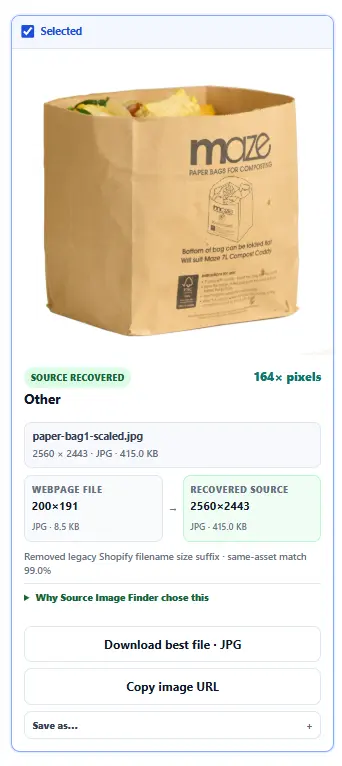
Compare image sizes from all three examples
| Website | Webpage image | Larger version found | Total pixel comparison |
|---|---|---|---|
| Evengreener | 200×191 | 2560×2443 | 163.72× |
| Alo Yoga | 300×120 | 7680×3066 | 654.08× |
| Cole & Son | 50×44 | 1920×1687 | 1472.29× |
These ratios compare the total number of pixels, not overall image quality.
How to download a higher-resolution image
- Paste the webpage URL.Enter the public webpage URL in Scan Single Page.
- Review the images.Compare the images found and any larger versions available.
- Download the file you want.Choose the version that fits your needs.
You can also check srcset image options, zoom links, and loaded image URLs manually in browser developer tools. srcset is an HTML attribute that can list several sizes of the same image.
Questions about high-resolution images
Is higher-resolution image recovery free?
Yes. Scan Single Page is free and does not require signup. Reasonable usage limits apply.
Does Source Image Finder use AI upscaling?
No. It finds and verifies image files that already exist on the website rather than generating larger versions.
Does a larger image always mean better quality?
No. More pixels can provide more detail, but dimensions alone do not determine overall image quality. HD is not a fixed standard for still images, so Source Image Finder shows the actual pixel dimensions of the files it finds.
Try it on a public webpage
Paste a webpage URL into Scan Single Page and see what image versions are available.